
Transform Your Drafting Speed in 5 Minutes
RapidPad converts any standard USB numberpad into a command center for AutoCAD and Revit. While your right hand stays on the mouse, your left hand gains instant access to the most-used commands – no more reaching across your keyboard or hunting through ribbons.
The result? 40% faster drafting and a more comfortable workflow.
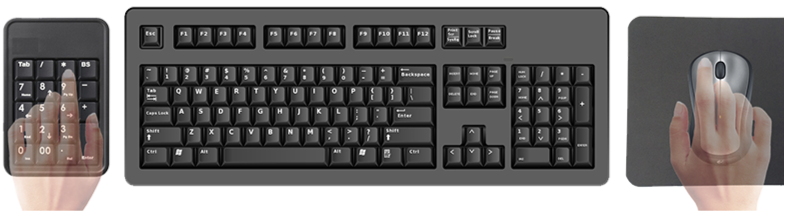
What You Need to Get Started
Simple setup in 2 easy steps:
1. Get a USB Numberpad (if you don’t have one) Any standard USB numberpad works – even a $15 one from Amazon. If you have a full-size keyboard lying around, you can use that temporarily until you get a dedicated pad.
The key is positioning: place the numberpad to the left of your regular keyboard for the most ergonomic experience. This creates the perfect drafting workstation where your left hand controls commands while your right hand stays on the mouse.

2. Download RapidPad & Start Your Free Trial The installer walks you through everything – from mapping your first commands to optimizing your workflow. You’ll be drafting faster within minutes.
Why RapidPad Works So Well
- Muscle Memory: Your left hand learns command positions while your right hand stays on the mouse
- No Interruption: Skip the keyboard shortcuts and UI hunting that break your flow
- Instant Access: Common commands become one-touch operations
- Ergonomic: Natural hand positioning reduces strain during long drafting sessions
Ready to experience the difference? Download RapidPad and see how much faster you can draft with a simple $20 upgrade to your workstation.